|
|
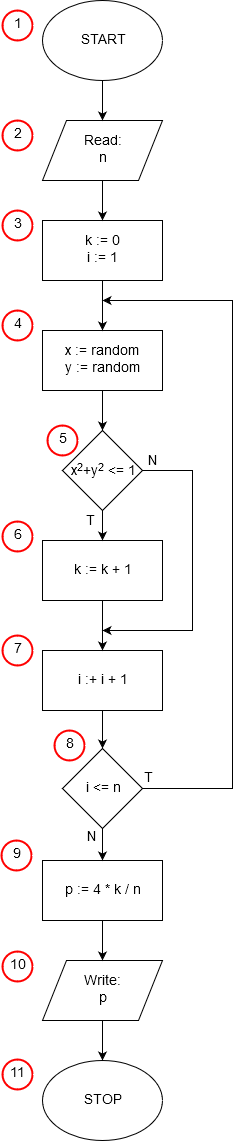
Setup and Input Data
The program begins with the necessary structure and requests input from the user.
- Code: <!DOCTYPE html> ... <script>
- Flowchart: Step 1 (START). These tags initiate the HTML document and the script execution block.
- Code: var n = prompt("n:", "");
- Flowchart: Step 2 (Read: n). The prompt function asks the user for the total number of points n and stores the input value in the variable n.
Variable Initialization and Loop Control
The program prepares the counters and defines the loop structure.
- Code: k = 0;
- Flowchart: Step 3 (Part 1: k:=0). The counter k (for points falling inside the circle) is initialized to zero.
- Code: for(i = 1; i <= n; i++){
- This single line of the for loop executes multiple flowchart steps:
- Part of Step 3 (i:=1): i = 1 initializes the loop counter.
- Step 8 (Decision: i≤n): i <= n checks if the loop condition is met. If true, the loop continues.
- Step 7 (i:=i+1): i++ increments the counter after each iteration.
- This single line of the for loop executes multiple flowchart steps:
Loop Body (Monte Carlo Simulation)
Inside the loop, the core simulation of random point generation and testing occurs.
- Code: x = Math.random(); and y = Math.random();
- Flowchart: Step 4 (x:=random, y:=random). The Math.random() function generates two random numbers between 0 and 1, representing the (x,y) coordinates of a point within the unit square quadrant.
- Code: if ((x * x + y * y) <= 1) k++;
- This instruction combines two steps:
- Step 5 (Decision: x2+y2≤1): Checks if the point lies inside the circle (a distance of 1 or less from the origin).
- Step 6 (k:=k+1): If the condition is true (a "hit"), the counter k is incremented.
- This instruction combines two steps:
Final Calculation and Output
Once the loop is complete, the final result is calculated and displayed.
- Code: p = 4 * k / n;
- Flowchart: Step 9 (p:=4∗k/n). The approximate value of Pi (p) is calculated by multiplying the ratio of hits (k) to total trials (n) by 4.
- Code: alert('pi = ' + p);
- Flowchart: Step 10 (Write: p). The alert function displays the final calculated value of Pi to the user.
- Code: </script> </body> </html>
- Flowchart: Step 11 (STOP). These closing tags terminate the script and the document.