|
|
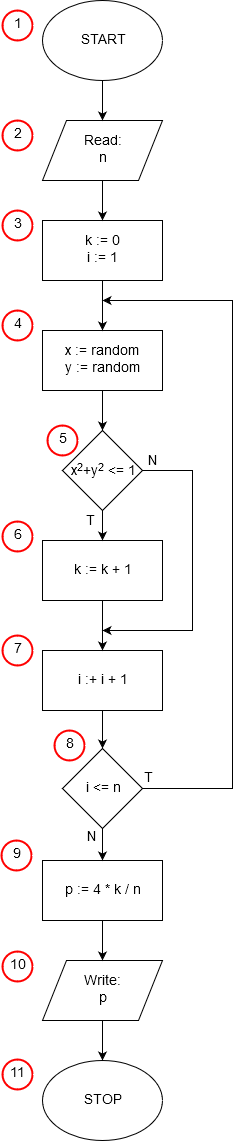
The first line of the program can be treated as an embellishment, though it's required by the Pascal language syntax. Every Pascal program must start with the keyword program preceding the program name, but it contributes nothing to the algorithm's execution.
Variable Declaration (Lines 3 and 4)
The third and fourth lines are auxiliary in nature. We know that our algorithm uses three integer variables and three real-number (floating-point) variables. In Pascal, all variables must be declared before the code block begins. When declaring a variable, we must specify the type of data it will store. The variable declaration starts with the keyword var.
Algorithm Block Implementation
- Line 6, containing the keyword begin, corresponds to the start block (1) of our algorithm.
- Lines 7 and 8 execute an input/output operation (2), where the input data—the number of sampled points n—is read.
- In line 9, we call the standard library function randomize. This function initializes the built-in pseudo-random number generator with a random value created based on the current content of the system clock at the moment of execution. If we didn't call this function, the program would generate the same sequence of pseudo-random numbers every time it runs, and as a result, we would always get the same result for a given number of sampled points. In every Pascal program that uses the pseudo-random number generator, we should call the randomize function once before the first sampling.
- In line 10, we reset k—the counter for points lying within the circle of radius 1 (3).
- Line 11 starts the for loop instruction. The instructions contained between the keywords begin and end will be executed n times (the loop control variable i changes from 1 to n, increasing its value by 1 each time). Line 11 implements part of step (3) of the algorithm by initializing the variable i to 1 at the beginning, and also implements steps (7) and (8) of the algorithm by increasing the control variable i by 1 after each execution of the loop instructions and checking whether the value of i has not yet exceeded the upper limit of the loop (i≤n). Exactly one instruction is always executed inside a for loop. If we need more instructions here, as is the case in our example, we must write them between the keywords begin and end as a compound statement.
Loop Body (Lines 12–14)
The instructions executed in the loop are contained in lines 12–14. For each sampled point, we first sample its coordinates x and y—step (4) of the algorithm. We use the library function random for sampling, whose result is a random (pseudo-random) number of type double in the range from 0 to 1. Then, in line 14, we check whether the point with the sampled coordinates x,y lies within the circle of radius 1 (5). If so, then further in the same line after the keyword then, we increase the content of the variable k by 1 (6).
Result Calculation and Output
After the loop finishes, the variable n contains the total number of sampled points (the content of n has not changed), and the variable k contains information about the number of sampled points lying within the circle of radius 1.
- In line 16, we assign the approximate value of π to the variable p (9), and then in line 17, we display the obtained result (input-output block (10)).
- The readln instruction in line 18 has no connection with the execution of the algorithm. It is used to pause the program until the Enter key is pressed, which prevents the program window from closing immediately.
- The end. instruction in line 19 terminates the program's execution (end of algorithm block (11)).