|
|
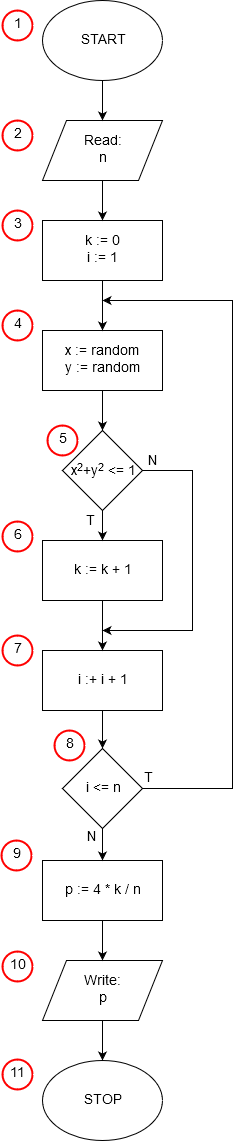
Setup and Input
- Step 1 (START): public class Pi { ... main ... Scanner ... These lines set up the Java class structure and initialize the scanner tool needed to read user input.
- Step 2 (Read: n): System.out.print("n = "); and int n=klaw.nextInt(); The program prompts the user to enter n (the total number of random points to generate) and stores this value.
Initialization
- Step 3 (k := 0, i := 1): int k=0; and for(int i=1; ... The variable k, which counts points hitting the circle, is set to 0. The loop counter i is initialized to 1 within the for loop header.
Main Loop (Monte Carlo Simulation)
- Step 4 (x := random, y := random): x=Math.random(); y=Math.random(); Inside the loop, the program generates two random numbers between 0.0 and 1.0 representing the coordinates (x,y) of a point.
- Step 5 (Decision: x2+y2≤1): if(x*x+y*y<=1) The program checks if the generated point lies inside the unit circle using the Pythagorean theorem formula.
- Step 6 (k := k + 1): k++; This line executes only if the condition in Step 5 is true. It increments the counter k for every "hit" inside the circle.
- Step 7 (i := i + 1): i++ The loop counter i is automatically incremented by the for loop structure after each iteration.
- Step 8 (Decision: i≤n): i<=n The loop checks if the number of iterations i is still less than or equal to the total requested points n. If true, it repeats from Step 4; otherwise, it exits the loop.
Calculation and Output
- Step 9 (p:=4∗k/n): double p=4.*k/n; The approximate value of Pi is calculated based on the ratio of points inside the circle (k) to total points (n). It is multiplied by 4 to account for the area ratio.
- Step 10 (Write: p): System.out.println(p); The final result p is printed to the console.
- Step 11 (STOP): } } The program reaches the end of the main method and terminates.